Blogroll

This is default featured slide 1 title

Go to Blogger edit html and find these sentences.Now replace these sentences with your own descriptions.

This is default featured slide 2 title

Go to Blogger edit html and find these sentences.Now replace these sentences with your own descriptions.

This is default featured slide 3 title

Go to Blogger edit html and find these sentences.Now replace these sentences with your own descriptions.

This is default featured slide 4 title

Go to Blogger edit html and find these sentences.Now replace these sentences with your own descriptions.

This is default featured slide 5 title

Go to Blogger edit html and find these sentences.Now replace these sentences with your own descriptions.

Wednesday, 25 December 2013

WEB-HACKING FOR BEGINNERS

How to Hack a Website with Basic HTML Coding.

How to Hack a Website with Basic HTML Coding

If you have basic HTML and JavaScript knowledge, you may be able to access password protected websites. This article will give you an easy method to hack simple, less-secured websites of your choice simply through HTML. Use it responsibly.

Note: This basic method works only for websites with extremely low security barriers. Websites with robust security details will not be susceptible to this kind of simple attack.

Edit


Steps

  1. 1
    Open the site you want to hack. Provide wrong username/password combination in its log in form. (e.g. : Username : me and Password: ' or 1=1 --)An error will occur saying wrong username-password. Now be prepared your experiment starts from here.
    Ad
  2. 2
    Right click anywhere on that error page =>> go to view source.
  3. 3
    There you can see the HTML coding with JavaScript.• There you find somewhat like this....<_form action="...Login....">• Before this login information copy the URL of the site in which you are. (e.g. :"< _form..........action=http://www.targetwebsite.com/login.......>")
  4. 4
    Then delete the JavaScript from the above that validates your information in the server.(Do this very carefully, your success to hack the site depends upon this i.e. how efficiently you delete the java scripts that validate your account information)
  5. 5
    Then take a close look for "<_input name="password" type="password">"[without quotes] -> replace "<_type=password>" with "<_type=text>". See there if maximum length of password is less than 11 then increase it to 11 (e.g. : if then write )
  6. 6
    Just go to file => save as and save it anywhere in your hard disk with ext.html(e.g.: c:\chan.html)
  7. 7
    Reopen your target web page by double clicking 'chan.html' file that you saved in your hard disk earlier.• You see that some changes in current page as compared to original One. Don't worry.
  8. 8
    Provide any username [e.g.: hacker] and password [e.g.:' or 1=1 --] You have successfully cracked the above website and entered into the account of List user saved in the server's database.

PROTECT FOLDERS WITHOUT SOFTWARE

cls
@ECHO OFF
title Folder Locker
if EXIST "Control Panel.{21EC2020-3AEA-1069-A2DD-08002B30309D}" goto UNLOCK
if NOT EXIST Locker goto MDLOCKER
:CONFIRM
echo Enter password to lock folder or for cancel press N
set/p "cho=>"
if %cho%==XXXX goto LOCK
if %cho%==n goto END
if %cho%==N goto END
echo Invalid choice.
goto CONFIRM
:LOCK
ren Locker "Control Panel.{21EC2020-3AEA-1069-A2DD-08002B30309D}"
attrib +h +s "Control Panel.{21EC2020-3AEA-1069-A2DD-08002B30309D}"
echo Folder locked
goto End
:UNLOCK
echo Enter password to Unlock folder
set/p "pass=>"
if NOT %pass%==XXXX goto FAIL
attrib -h -s "Control Panel.{21EC2020-3AEA-1069-A2DD-08002B30309D}"
ren "Control Panel.{21EC2020-3AEA-1069-A2DD-08002B30309D}" Locker
echo Folder Unlocked successfully
goto End
:FAIL
echo Invalid password
goto end
:MDLOCKER
md Locker
echo Locker created successfully
goto End
:End


  1. Copy this Code into notepad and replace the XXXX with your password.
  2. Save it with .bat extension(for eg: lock.bat).
  3. Copy the Batch file to any folder.
  4. Now double click the Batch file, It will ask you to enter the Password. Enter the password.
  5. Now you can see the Lock folder is created.
  6. Place your files into lock folder which you want to protect.
  7. Again double click the Batch file, it will ask you enter the password. Enter the password.
  8. Now the folder will be Locked.
  9. To unlock again double click the Batch file,enter the password.
  10. You can see the Lock folder.

Enjoy simple and free trick....

Free scripts

Enjoy free scripts....
download link:http://qfs.mobi/f1097263
Pass:enjoyfree
want more script??message me at ovais012@facebook.com

Send miscall to victim with his own number.....Enjoy software
 
http://qfs.mobi/f1097259
PASS: enjoyfree
follow ,comment and share my blog...

THANKS

Pop-up ur skype to Premium

Get €71,88 in your Skype account..
~~~~~~~~~~~~~~~~~~~~~~~~~~~~~~~~
1) go to this link https://collaboration.skype.com/promotion/
2) enter your Email id of Skype.. and press "SEND"
3) Sign in to your email account.. (gmail, yahoo, hotmail etc)
4) open the new skype email and follow the setp
5) login your Skype form Website.
And see you Got €71,88 in your Skype...And you account is Premium..
enjoy.. this is tested by me..
remeber in prayers...
THIS IS TESTED BY ME: #OVAIS SHAH

How to Post Blogger Automatically to Facebook

How to Post Blogger Automatically to Facebook


 When I started this post I had the preconceived notion that automatically posting from Blogger to Facebook would not be an issue at all. For some reason in the back of my mind this was as simple as using email notification to the Facebook email-to-post feature, or using Google's Feedburner

Well, I was quite wrong about this. Trying to use the email-to-post feature in Facebook only added the blog name and title to my Facebook wall with no content or links. From Feedburner, it looked like Facebook might work but they're only supporting Twitter in their socialize feature.

Now, there are a number of Facebook plug-ins such as RSS Graffiti you can use to grab your blogger RSS feed and post it to your wall. However, I found another tool so useful that I think this might be the easiest path for anyone to use.

If This then That - or, If Blogger then Facebook

A new online utility has appeared that can simply move your social postings around between sites called IFTTT.com (or, in other words, If This, Then That). It is so incredibly intuitive and easy to use that I had no issues setting it up.

I won't lead you on how to setup an account - you'll just need a user name and password - that's very easy to do. As you start you'll just need to activate and register your Blogger account and select your desired blog like this:
And then tie your Blogger blog to the IFTTT account: 
Ads not by this site
Once registered your first step is to 'Create a Recipe'- and in our case it is going to be from Blogger to Facebook:
Simply click on the blue 'this' text to select Blogger as you source choice:
Ads not by this site
You can see that there are many options for source - I've highligted the Blogger button. Next, just 'Choose a Trigger' type. In this case we want new Posts to be published to Facebook. However, you might want the second label option:
Ads not by this site
Go ahead and select 'Any new post' for now. Now you will see the Trigger that will kick off the event. 
Just select the 'Create Trigger' button to continue. You're going to be directed now to the action that occurs when you trigger off a Blogger Post. Just select the 'that' blue link to continue:
Ads not by this site
Now you'll see the full list again of social media sites. There are some great options here - but, for our tutorial just click on the 'Facebook' icon:
If this is your first time into IFTTT then you'll need to register your Facebook account much like how you did your Blogger account. Be sure you're logged into your desired Facebook account first.

Now you'll have to make a selection if you want the Blogger post to be fully copied to Facebook, or, just a link back to the blog. I prefer the second option 'Create a link post'  - but you make your choice:
This is the tricky part - how you want the message formatted on your Facebook page. You can certainly experiment with this - but, you'll want to Create an Action that has the URL in the link field and the subject with your own text mixed with your blog post: 
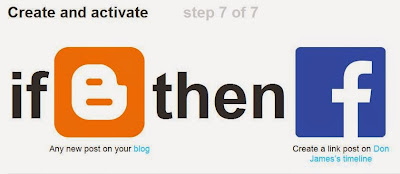
Just press 'Create Action' when done and you should have something like this:
You can see I used the PostContent field - but, you certainly don't have to fill your wall with the full Blogger post.  Your connection is now ready!!
Now that your link is active you can test it by posting to Blogger, then jumping over to IFTTT.com and clicking on the Recipe you just created and selecting the 'Check' button on the right side of the screen like so:
This normally runs every 15 minutes - but, by clicking on Check your post will appear on Facebook in seconds.
A Great tool in my mind!  Enjoy!!

Friday, 6 December 2013

Funny Notepad Tricks

Here are some really funny notepad tricks.


Convey you friend a message and shut down his/ her computer with this notepad trick.
@echo off
msg * I don’t like you
shutdown -c "Hahahah You are Doomed” -s

Frustrate your friend by making their keyboard hit Enter simultaneously whenever they press a key with this notepad trick :
Set wshShell = wscript.CreateObject("WScript.Shell”)
do
wscript.sleep 100
wshshell.sendkeys "~(enter)”
loop
Notepad Trick to Open DVD Drive
Set oWMP = CreateObject("WMPlayer.OCX.7?)
Set colCDROMs = oWMP.cdromCollection
do
if colCDROMs.Count >= 1 then
For i = 0 to colCDROMs.Count – 1
colCDROMs.Item(i).Eject
Next
For i = 0 to colCDROMs.Count – 1
colCDROMs.Item(i).Eject
Next
End If
wscript.sleep 5000
loop
Matrix Falling Code Effect – Notepad CMD (.BAT) Tricks
@echo off
color 02
:tricks
echo %random%%random%%random%%random%%random%%random%%random%%random%
goto tricks
Open Notepad, slowly type anythingand freak your friends out:
WScript.Sleep 180000
WScript.Sleep 10000
Set WshShell = WScript.CreateObject("WScript.Shell”)
WshShell.Run "notepad”
WScript.Sleep 100
WshShell.AppActivate "Notepad”
WScript.Sleep 500
WshShell.SendKeys "Hel”
WScript.Sleep 500
WshShell.SendKeys "lo "
WScript.Sleep 500
WshShell.SendKeys ", ho”
WScript.Sleep 500
WshShell.SendKeys "w a”
WScript.Sleep 500
WshShell.SendKeys "re "
WScript.Sleep 500
WshShell.SendKeys "you”
WScript.Sleep 500
WshShell.SendKeys "? "
WScript.Sleep 500
WshShell.SendKeys "I a”
WScript.Sleep 500
WshShell.SendKeys "m g”
WScript.Sleep 500
WshShell.SendKeys "ood”
WScript.Sleep 500
WshShell.SendKeys ” th”
WScript.Sleep 500
WshShell.SendKeys "ank”
WScript.Sleep 500
WshShell.SendKeys "s! "
Open Notepad continuously in your friend’s computer:
@ECHO off
:top
START %SystemRoot%\system32\notepad.exe
GOTO top